How can we help?
Booking, checking in, the screens and everything in between. Search below or jump to a topic.
Everything you need for class day
Getting started
We're a hybrid reformer Pilates studio. You get live, instructor-led group classes and 24/7 on-demand training, all in one studio.
Every reformer has its own screen with 1,000+ on-demand classes you can do any time, day or night. Prefer in-person coaching? Our live classes are layered, so beginners and advanced members can train side by side at their own level.
No problem at all. Our studios welcome complete beginners through to advanced members, and every class can be modified or progressed to suit you.
- On-demand: tap Filter on the right of the screen to sort by level, class length, props and focus area.
- Live classes: read the class description in the app before booking to check it suits your level and goals.
Still unsure? Our team is always happy to point you in the right direction.
- 1Choose your studio and the membership or class pack that suits you.
- 2Download the 247 Reformer app and sign in.
- 3Book your first class and you're ready to go.
Memberships with 24/7 access are for members 18 and over.
We offer under-18 memberships for ages 12 to 17 at all studios, with written approval from a parent or guardian. These are for live, instructor-led group classes only. On-demand and 24/7 access aren't available for under-18s.
Booking & check-in
First grab your intro offer or a membership, then download the 247 Reformer app. Booking takes 4 taps:
 1. On the home screen, tap Book a Group Class
 2. Tap the circle next to the class you want
 3. Tap Book Now
 4. Tap Confirm Booking. Done!
On-demand classes run 24/7 on the screen at your reformer. Book a 45-minute slot in the app:
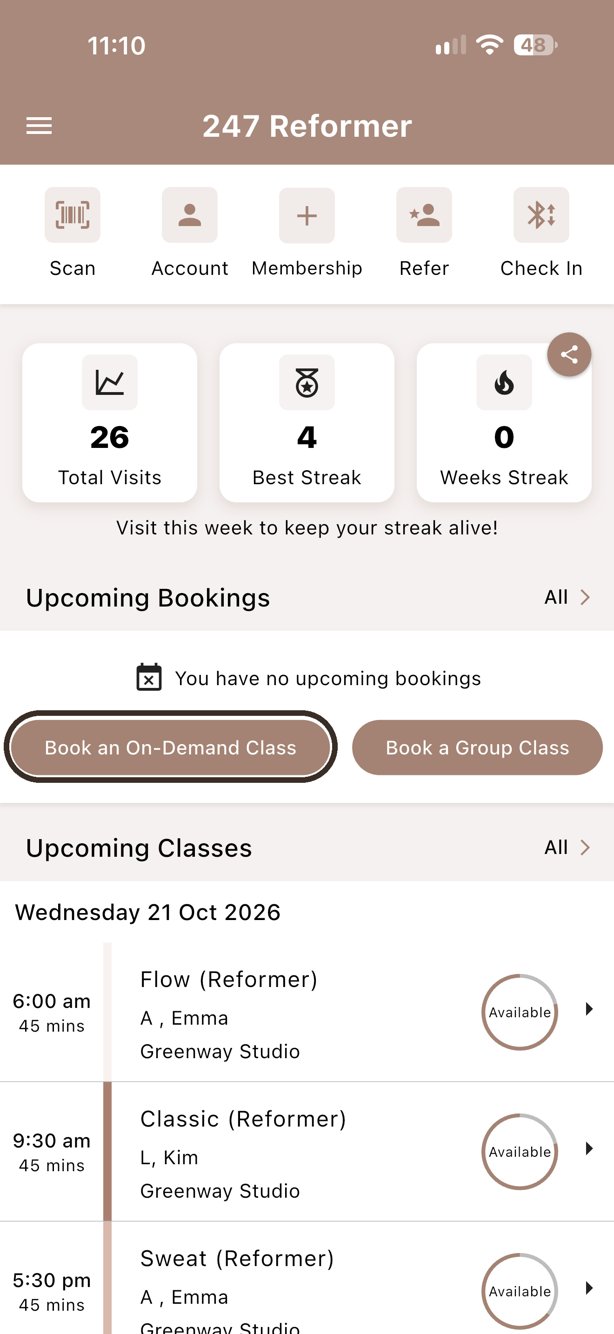 1. On the home screen, tap Book an On-Demand Class
 2. Tap On-Demand Class | 45 Minutes
 3. Pick a day and tap Book next to your time
 4. Tap Confirm Booking. Then just tap Check In at the door when you arrive.
- 1Make sure you have a booking for that time.
- 2At the studio, open the app and tap Check In at the door reader to the left of the door.
- 3The door clicks open. Simply push to enter and choose any free reformer.
Checking in also marks you as attended, so there's nothing else to do.
- On-demand sessions start every 15 minutes, day and night.
- Each booking is a 45-minute session.
- You do need to book a slot. It saves your reformer and stops double bookings.
- Please start at your booked time and finish by your end time (book 1:00pm, finish by 1:45pm).
You can book classes up to 3 weeks in advance.
We have a 4-minute rule so classes run smoothly and safely. More than 4 minutes late, and the door won't let you in.
In the studio
- Minor injury: stop exercising and use the first aid kit (see below for where to find it).
- Equipment, the door or a screen isn't working: stop using it and call your studio.
- Once you're safe, call your studio to let us know what happened. If no one answers, leave a message and we'll call you back first thing.
Where to find the first aid kit:
Studio phone numbers:
- 1Choose any free reformer and tap the screen.
- 2Sign in or create an account to track your progress and save favourites. Just here for one class? Tap Continue without an account.
- 3Tap Filter on the right to find a class by level, props or focus area.
- 1Tap the headphone button on the screen.
- 2Put your headphones into pairing mode.
- 3Press Pair and you're connected.
Forgot your headphones? The screen has a built-in speaker. If the studio is busy, please keep the volume low.
- 1Find the button at the bottom right of the screen (underneath or just behind it).
- 2Press and hold until the restart option appears.
- 3Select Restart.
Still having trouble? Call your studio and we'll help:
- Grip socks
- A drink bottle
- A towel
- Comfortable activewear
- Headphones for on-demand classes
Cancellations & policies
Cancel in the app. Doing it early frees up the reformer for someone else.
Three no-shows (live and on-demand combined) means a 7-day break from booking. Your membership fees continue as normal during that time.
To keep everyone safe, tailgating isn't allowed. That means letting anyone else in on your access, even a friend.
A $50 tailgating fee applies, and access may be suspended or cancelled.
Yes. You can freeze for up to 3 months in any 12-month period, and we can help with cancellations and transfers between studios.
Reach out to your studio, or start your 14-day trial and see it for yourself.
Your first class
is on us
New to 247? Try a class at your closest studio, on us.
✕